
Pocket Wi-Fi rental in Korea: airport pickup and returns

MK Lee · How we verify · sources checked SEP 10, 2026
Highlights
The short answer
Visitors can rent an LG U+ pocket Wi-Fi router on the day they land at an LG U+ customer centre at Incheon or Gimpo Airport, bringing a passport and a card in the same name; booking ahead is optional and brings extra discounts. You can return it at any LG U+ customer centre at Incheon, Gimpo or Gimhae airport, even if you rented elsewhere. LG U+ does not offer delivery, so you pick the router up at an airport centre. If you would rather have nothing to hand back, LG U+ says its data SIM and eSIM need no return once paid at purchase. Details were checked against LG U+ and airport pages in September 2026.
SIM, eSIM & Connectivity · Data · Numbers · Wi-Fi
A pocket Wi-Fi router is a hotspot device that you rent and then return, settling the rental when you hand it back. This guide is for visitors who want to rent one at Incheon International Airport (인천국제공항) or Gimpo International Airport (김포국제공항). It covers what to bring, where the counters are, how the LG U+ Tour Pass differs, and how to return the device, including what to do if the counter is closed when you need it. Unless a section says otherwise, the rental rules below are those published by LG Uplus.
Do I need to book a pocket Wi-Fi before I fly?
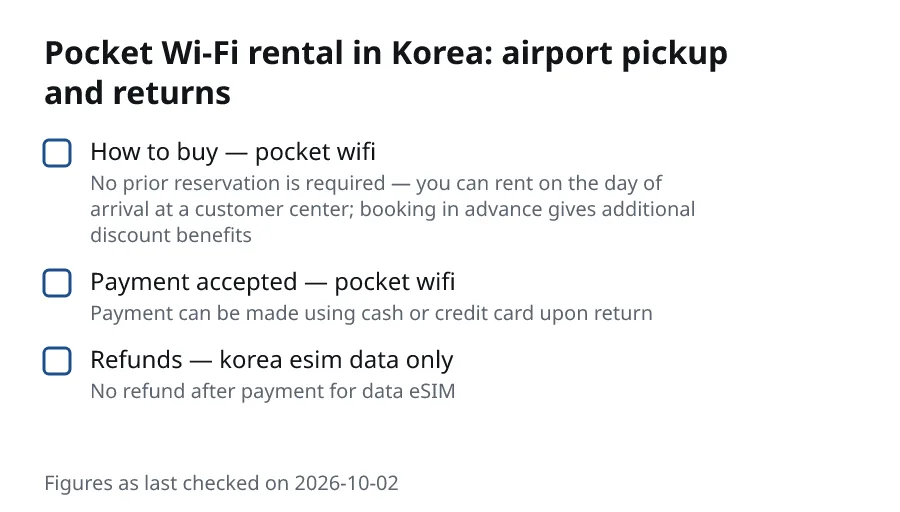
No. No prior reservation is required — you can rent on the day of arrival at a customer center; booking in advance gives additional discount benefits.
Booking ahead is worth considering if you want the discount. Walking up is fine if your plans are still changing.
There is one limit on where you collect it. LG U+ customer centers are located at Incheon Airport, Gimpo Airport, and Gimhae Airport; no delivery service is offered. The router cannot be sent to your hotel; you pick it up at one of those airport centres.
What do I need to bring to the rental counter?
Bring two things, and make sure the names match. A passport and a credit or debit card in the same name as the passport are required for on-site rental; credit cards are not charged but used for deposit hold, debit card deposits are prepaid and auto-refunded.
In practice, this means:
- Your passport. Keep it in your hand luggage rather than a checked bag, because you will need it at the counter before you leave the airport.
- A credit or debit card in the passport holder's name. If one person in your group is renting for everyone, that person's passport and card go together.
- A plan for the return. The rental is settled when you hand the device back, so decide early which airport you will leave from and when.
If you only have a debit card, expect the deposit to be taken from your account at the counter and refunded automatically, rather than held as it would be on a credit card. Check with your bank how long a refund usually takes to appear.
Where are the rental counters at Incheon and Gimpo?
LG U+ has a customer centre for pocket Wi-Fi and SIM rental at both Incheon and Gimpo:
- An LG U+ customer center for pocket Wi-Fi and SIM rental is located at Incheon Airport.
- An LG U+ customer center for pocket Wi-Fi and SIM rental is located at Gimpo Airport.
At Terminal 1 of Incheon, the airport also lists the carrier's roaming counter. LG U+ Roaming Center open 24 hours near Arrival Hall F on the west side of 1st Floor, Terminal 1.
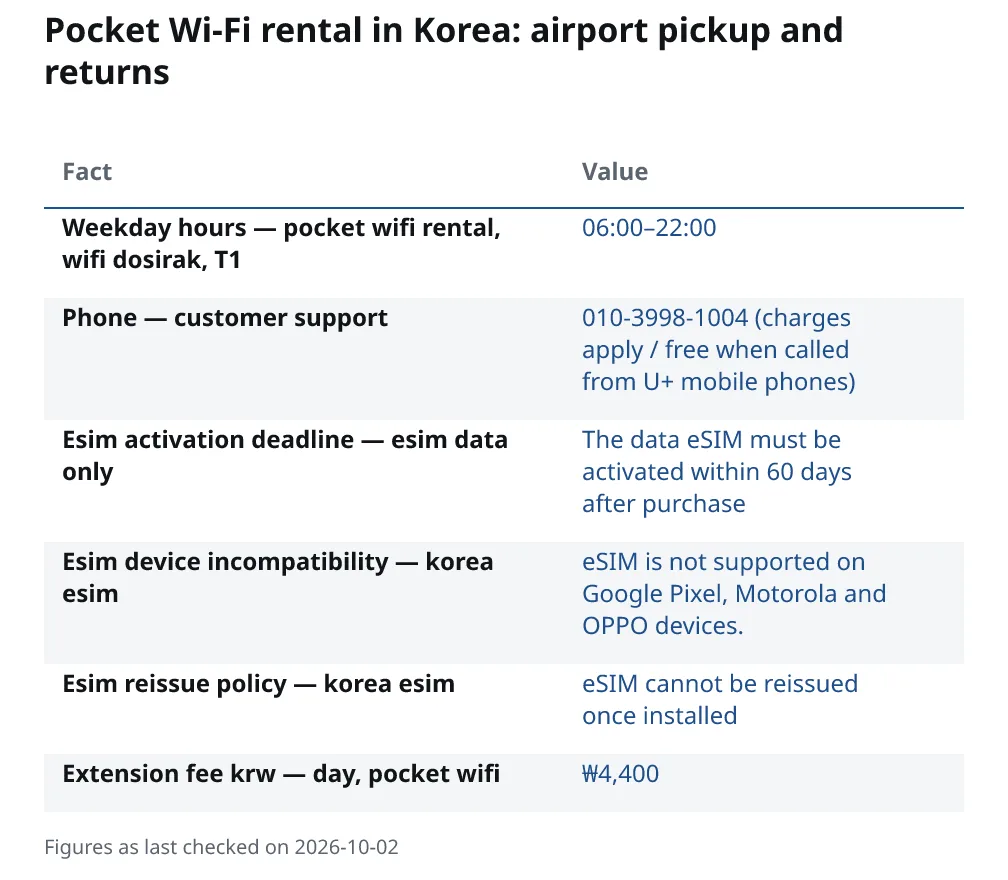
LG U+ is not the only operator. At Terminal 1 there is also a separate rental brand, Wi-Fi Dosirak. Wifi dosirak pocket Wi-Fi counter near Arrival Hall F on the west side of 1st Floor, Terminal 1. Its listed weekday hours are 06:00–22:00. The rules in the rest of this guide, including returns at another airport, are LG U+ rules; if you rent from Wi-Fi Dosirak or any other company, ask that company about its own return process when you collect the device.
Pocket Wi-Fi, data eSIM or Tour Pass: which suits my trip?
A router is one of several ways to get data. One difference is what you have to hand back.
| Pocket Wi-Fi | Data eSIM | LG U+ Tour Pass | |
|---|---|---|---|
| Form | Separate hotspot device | Installed on your phone | TOUR PASS is available in both eSIM and SIM Card formats. |
| Returning it | Must be returned and settled | No return once paid at purchase | Ask when you collect it |
LG U+ puts the return difference this way. A data SIM or eSIM does not need to be returned once paid off at purchase, unlike a rented pocket Wi-Fi device which must be returned and settled. Our sources do not say the same for the Tour Pass, so ask about returns when you collect one.
A router lets several devices share one connection, up to the limit given further down, which can help if several people are travelling together or you carry a laptop or tablet as well as a phone. It is also an option if your phone cannot take an eSIM. eSIM is not supported on Google Pixel, Motorola and OPPO devices. Check your own model before you rely on an eSIM.
For comparison, LG U+ lists these prices for its data-only eSIM:
| Length | Price |
|---|---|
| One day | ₩6,500 |
| Two days | ₩12,000 |
| Three days | ₩18,000 |
| Four days | ₩23,000 |
| Five days | ₩27,500 |
Read the conditions before you buy the eSIM:
- The data eSIM must be activated within 60 days after purchase.
- No refund after payment for data eSIM.
- eSIM cannot be reissued once installed.
If you collect a SIM or eSIM at an airport counter rather than a router, the deposit works in a similar way. A credit card is authorized for 1,111 KRW without being charged as the deposit at the airport counter; the same name as the passport is required. With a debit card instead, the deposit taken is ₩70,000.
Our sources do not give a daily rental price for the pocket Wi-Fi router itself, so ask for the full rental cost at the counter or on the booking page before you commit.
What is the LG U+ Tour Pass, and is it a pocket Wi-Fi?
It is not a router. The LG U+ Tour Pass is a mobile data product that also works as a public transport pass, and it comes on your phone rather than as a separate device. TOUR PASS covers all regions in Korea, including access to the Airport Railroad(all stop train) between Seoul and Incheon Airport.
There are limits on the airport run. On the Airport Railroad, TOUR PASS covers only the all-stop train; express trains and airport limousine buses are not supported. If you want the Express train into Seoul, or you plan to take a limousine bus, the pass does not cover it.
The pass's validity is counted from its first use on public transport. TOUR PASS is valid for 3 or 5 days from the first time it's used on public transportation (72 or 120 hours).
To get one: TOUR PASS can be reserved through the LG U+ website and picked up at the Roaming Centers in Incheon, Gimpo, or Gimhae Airport, or purchased directly at the Airport Roaming Center for immediate use.
If your plans change, note when a refund is still possible. A TOUR PASS refund can be requested before using either the mobile data or the public transportation benefit; the roaming center should be contacted for assistance.
Where can I return the router?
You are not tied to the counter where you started. The device can be returned at any LG U+ customer center at Incheon, Gimpo, or Gimhae airport, even if it is not the one where it was originally rented.
This is useful when you arrive at one airport and leave from another. If you landed at Incheon and fly home from Gimpo, return it at the Gimpo centre on your way out, and the same works in reverse.
The return points LG U+ lists are its airport customer centres, so build the return into your departure day:
- Keep the router, its cable and any case together in your hand luggage on the last day.
- Allow time to visit the LG U+ centre before your flight.
- Settle any balance, then check that the deposit hold or refund has been recorded before you leave the counter.
How do I pay, and what if I want to keep it longer?
Payment can be made using cash or credit card upon return.
If your trip runs longer than planned, you can extend the rental rather than rushing back to the airport. LG U+ lists an extension charge of ₩4,400 per day for the pocket Wi-Fi.
LG U+ customer support is on 010-3998-1004 (charges apply / free when called from U+ mobile phones).
This guide's sources give the extension fee but not the steps for extending, so ask customer support how to arrange one.
What if the counter is closed when I need to return it?
If your flight leaves late at night or early in the morning, plan the return in advance. Our sources do not document an unattended drop box, locker or night desk for returning an LG U+ router, and they do not say whether the roaming counter listed as open around the clock at Incheon Terminal 1 accepts returns at night. Do not assume that an unstaffed return is possible.
Instead, before your last day:
- Call customer support on the number above and ask where and when you can return the device for your flight time.
- Return it earlier. If your flight leaves at an awkward hour, hand the router back when you pass an airport centre earlier in your trip, and use hotel or café Wi-Fi for the final hours.
- Use another airport. Because any LG U+ airport centre accepts returns, you can hand the router back at Gimpo or Gimhae if you pass through one of them earlier in your trip.
- For Wi-Fi Dosirak or another company, ask the provider directly. Its Terminal 1 counter keeps the listed weekday hours shown above, and our sources do not cover its return rules.
If you know from the start that you will land or leave outside staffed hours, consider a data SIM or eSIM instead, which LG U+ says does not need to be returned once paid at purchase.
Questions people ask
Do I need to reserve a pocket Wi-Fi before I travel to Korea?
No. You can rent one on the day you arrive at an LG U+ airport customer centre. Booking in advance is optional and brings extra discounts.
Can I return the router at a different airport from the one I rented at?
Yes. LG U+ accepts returns at any of its airport customer centres at Incheon, Gimpo or Gimhae, not only the one where you collected the device.
Can the pocket Wi-Fi be delivered to my hotel?
No. LG U+ does not offer a delivery service, so you pick the device up at one of its airport customer centres at Incheon, Gimpo or Gimhae.
Is the LG U+ Tour Pass a pocket Wi-Fi router?
No. It is a mobile data product on an eSIM or SIM card that also works as a public transport pass, rather than a separate device. See the Tour Pass section above for its limits.
Will my credit card be charged for the deposit?
A credit card in the passport holder's name is used to hold the deposit rather than being charged. A debit card deposit is taken up front and refunded automatically when the device is returned in good condition.